

What does the cone in the game plan show?
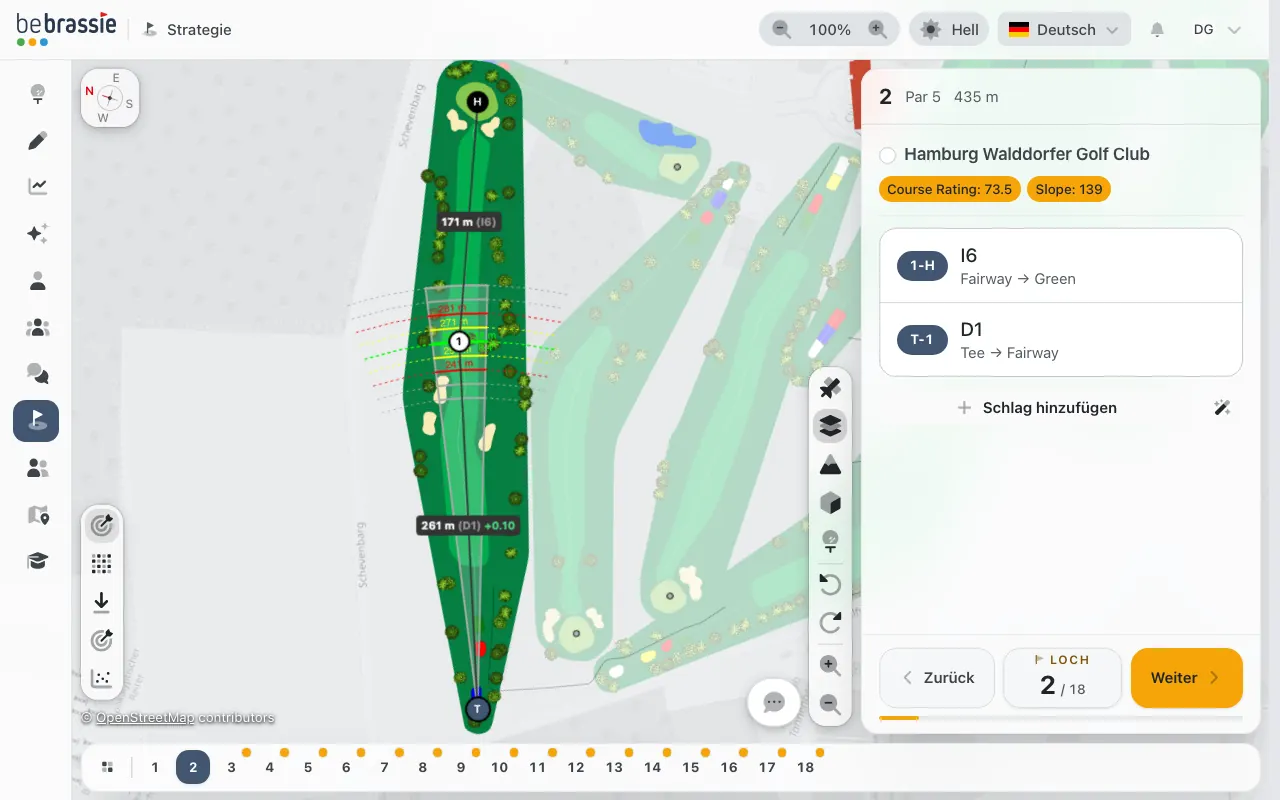
When you plan a shot, it isn't only the length that counts, but also how widely your shots with that club scatter. The cone in a bebrassie game plan shows exactly this lateral dispersion, your own, for each club separately. You show and hide it on the map with the Cone button.
Where the values come from
The dispersion is calculated from the shots of your signed rounds; score-only rounds don't count. Chips, pitches and recovery shots are left out, and the 5 percent with the greatest deviation drop out as outliers. You set which rounds count in the game plan under Calibration → Include rounds. The default there is All rounds.
The cone reaches one standard deviation to the left and right. With normally distributed values, about two thirds of your shots land inside it and one third outside.
How to use it to choose your target
The angle of the cone stays the same for a club. So if you move the target point farther away, it gets wider; if you move it closer, it gets narrower. That shows you which club suits which target.
Above all, avoid larger areas inside the cone that cost you a shot through a penalty, such as out of bounds or a penalty area.
Video on choosing a target and on the lines in the cone. It shows the older version of the app, but the idea still applies.