

bebrassie UniversityFirst Steps
How do I set up my clubs?
New accounts in bebrassie are set up with a standard set of clubs. So that the app picks the right club during the post-round review and your stats fit your bag, replace it with your own clubs.
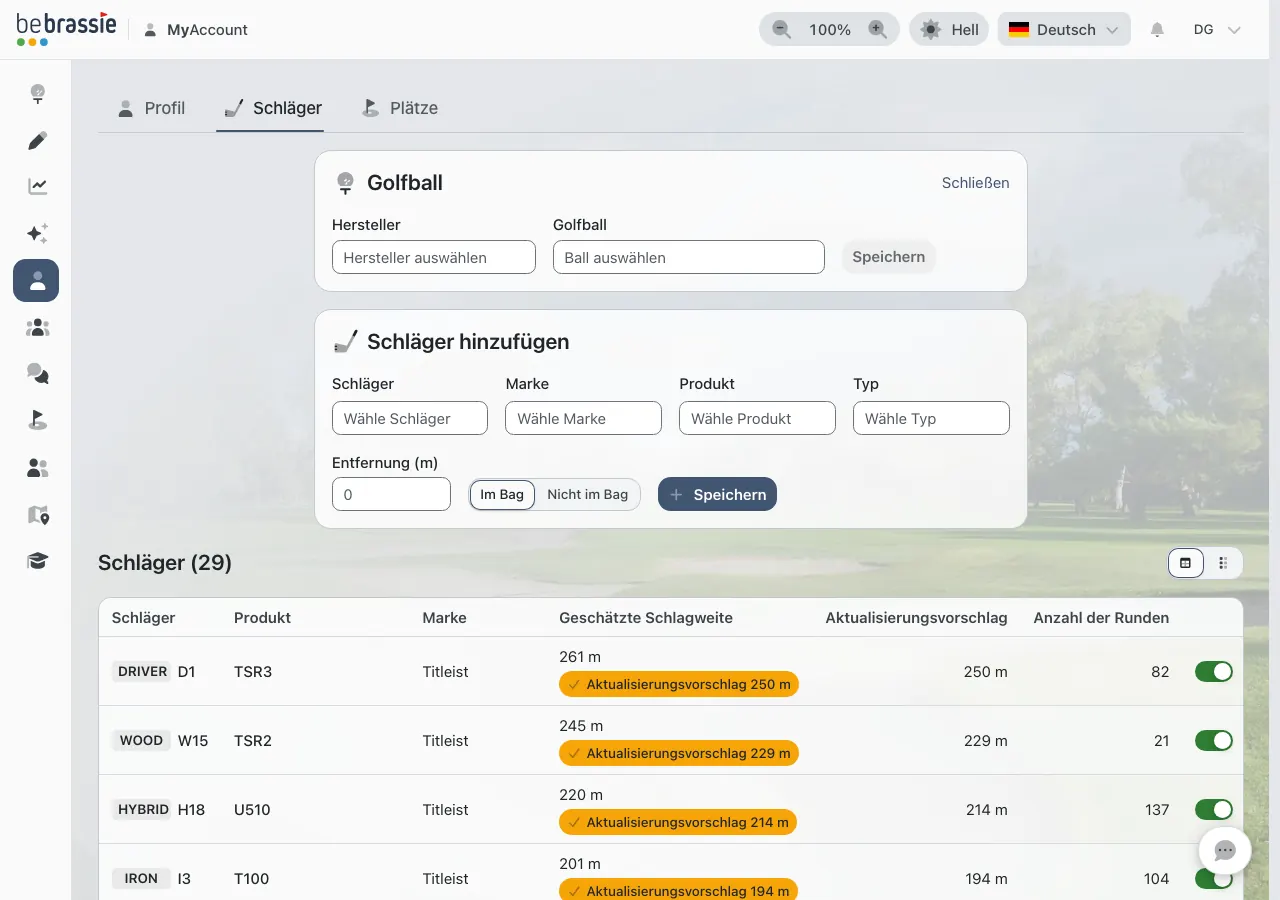
Add clubs
- Open your clubs Open in the app in your profile. On iOS you find them in the More tab under Clubs & Ball. On Android, use the browser at app.bebrassie.com.
- Select Add club.
- Fill in Club, Brand, Product and Type.
- Under Distance, enter the normal distance you hit with this club: rather the carry for shots to the green, rather the total length for clubs you use off the tee.
- Use In my bag or Not in my bag to set whether it belongs to your bag, and confirm with Save.
Remove standard clubs
Then remove the preset clubs with Remove. If you have already tracked rounds with a standard club, Replace for X round(s) also replaces it with your own in those rounds.
Wedges and missing models
For wedges we usually distinguish between PW, GW, SW and LW. For some models we also offer the loft as a distinction.
If you can't find a club in the database, send us a message at support@bebrassie.com asking us to add it.
Still have questions?
Write to us. We will help you out.