

Lost ball or out of bounds? How do I record a penalty stroke?
If your ball is lost or out of bounds, it costs you a penalty stroke. In bebrassie you enter it during the post-round review, the step where you check your shots on the map.
One thing first: the hole's score in the Scorecard must already include the penalty stroke. Entering it doesn't add a shot; an existing shot becomes the penalty stroke.
If the ball is clearly off the course
- Drag the shot on the map to where the ball probably came to rest.
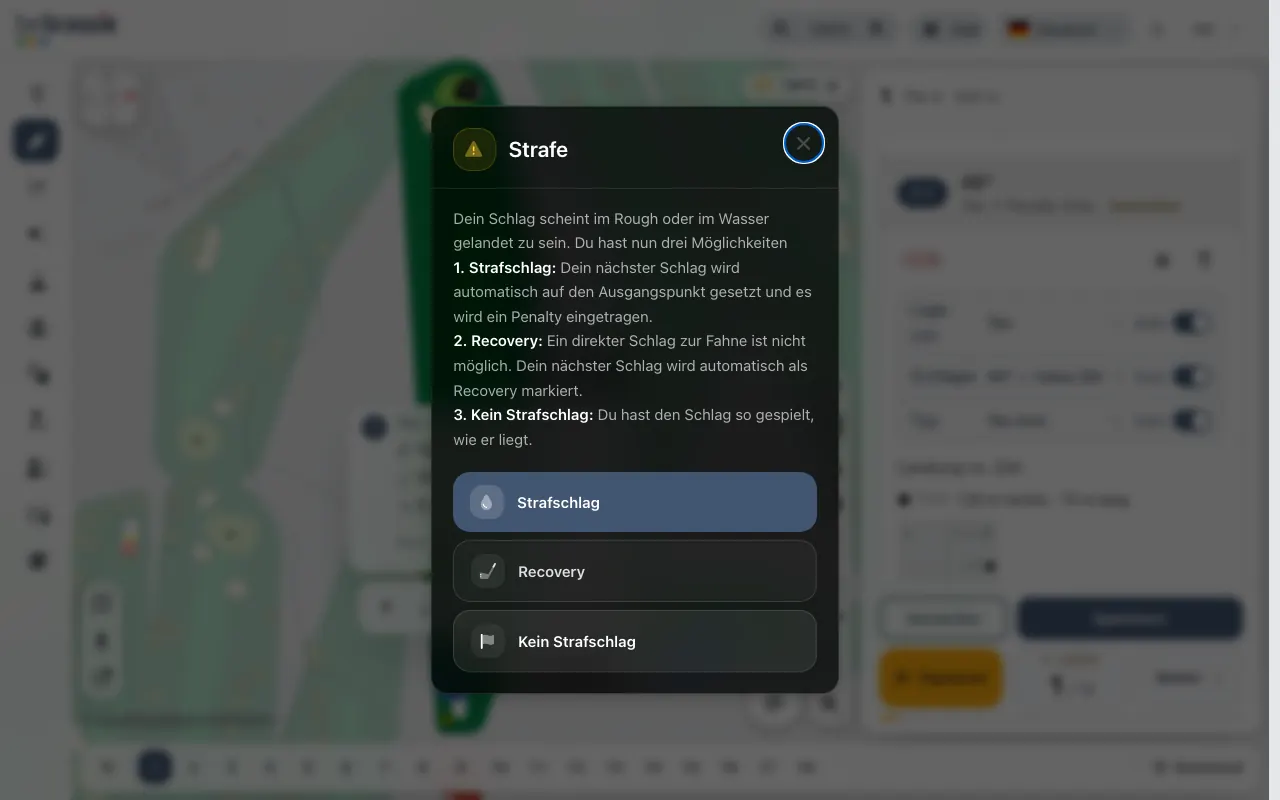
- The Penalty pop-up opens. Select Penalty stroke.
- The shot is marked as a penalty stroke and its line is dashed. The next shot jumps back to the point you last played from.
- Position the remaining shots as usual.
If no pop-up appears
The pop-up only appears if that spot on the map is recognized as out of bounds or a penalty area and another shot follows. Otherwise you enter the penalty stroke by hand:
- Drag the shot to where the ball came to rest and click it.
- Open the Type icon and select Penalty.
- Drag the next shot to the point you played on from and click Save.
The video on penalty strokes shows the older app. The procedure is the same, but the buttons look different today.
Still have questions?
Write to us. We will help you out.